

Featured
Insights
M365 Copilot Hub
All the latest insights, articles and resources on M365 Copilot, curated into one place.
The sun is setting on Microsoft Project Online, with Microsoft announcing it will be fully retired on September 30, 2026.
If your organisation relies on Project Web App (PWA) in Microsoft 365 for project and portfolio management, this is a big milestone but not an immediate outage. The service will continue to operate until the retirement date, giving customers time to plan a smooth transition.
In this post, I’ll walk you through all the need-to-knows to plan for Project Online retirement including key dates, why Microsoft is making this change, how to check if your customers are affected and the transition options available.
Retiring: Project Online comprising the cloud service / PWA experience.
Not affected: Project desktop, Project Server Subscription Edition, and Microsoft Planner, including premium capabilities.
In Microsoft’s words, Project Online’s legacy architecture limits how quickly the product can evolve and integrate with newer, collaborative and increasingly AI-assisted ways of working. The Project Online retirement signals that Microsoft is concentrating investment in the modern work management stack, including Planner, Microsoft 365 Copilot, and the Project Manager agent with the aim of delivering more scalable, integrated experiences across Microsoft 365.
Typically, Project Online retirement will affect users with the following licenses:
You can confirm if they are affected with the following steps:
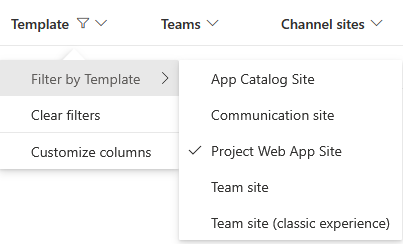
If any sites appear on the list, click on the URL. You will need to do this for each Project Web App Site.
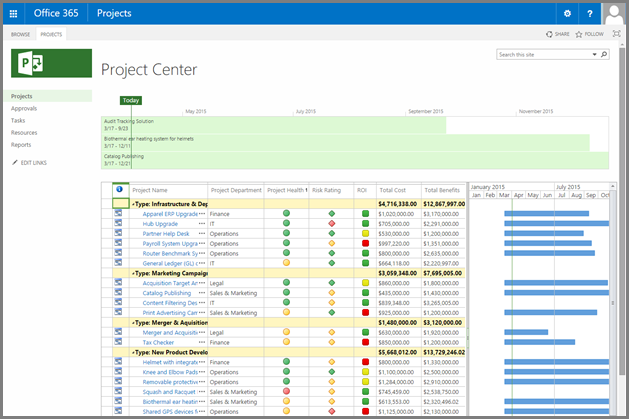
Microsoft highlights several paths forward. The best choice depends on whether you need lightweight team planning, modern project scheduling, or full project-and-portfolio management (PPM) with operational features like timesheets and resource scheduling.
Planner is Microsoft’s main tool for managing work. It is often overlooked in favour of other subscription based Kanban style project tools but offers solid features as part of every M365 subscription and includes features from Project for the web. These include:
With premium plans, you get extras like Gantt charts, task dependencies, baselines, and portfolio views. If you use Copilot, the Project Manager agent can help create tasks, update statuses, and generate reports with AI.
If you need advanced project and portfolio management, Project Server Subscription Edition is your best bet. It offers detailed planning, scheduling, and resource management, all based on SharePoint Server.
Key features and capabilities include:
Requirements:
Requires SharePoint Server Subscription Edition (Enterprise).
Supported on Windows Server 2019/2022 and SQL Server 2019.
Dynamics 365 Project Operations is an end-to-end solution that connects sales, resourcing, project management, and finance teams on one platform. It streamlines project delivery by integrating Microsoft Project capabilities, CRM functionality for quoting, resource scheduling, time/expense tracking, and project accounting to enhance profitability and collaboration. This alternative option to Project Online is best for organisations that need strong timesheet and resource scheduling features.
Key features include:
Project Operations offers three deployment scenarios tailored to business needs:
The Project Online retirement announcement is a clear signal that Microsoft is heading toward a more integrated work management experience built around Microsoft Planner, with increasing support from Copilot and AI agents.
The key is to treat September 30, 2026 as a firm deadline and use the runway to choose the right destination, prove it with a pilot, and move with confidence.
At Crayon, we are on the partners’ side. Always. We can assist you to review the best fit alternative for your customers based on their needs and requirements and support you in having those conversations.
If you have customers that will be affected by the Project Online retirement, reach out to your account manager for more information or email the Modern Work Technology Advisory Group.
Insights
All the latest insights, articles and resources on M365 Copilot, curated into one place.

Press Release
Crayon, a SoftwareOne company, has been named a finalist in 10 categories at the ARN Innovation Awards 2026, recognising its partner-first approach, people and leadership in Australia.

Press Release
Crayon, a SoftwareOne company, is a finalist in three categories at the 2026 Reseller News Innovation Awards, recognising its partner-first approach to distribution.

Press Release
Crayon, a SoftwareOne company, wins the 2026 GTIA ANZ Advancing Diversity in Technology Leadership Award, with Nathan Chau also Highly Commended as a Future Leader.

Press Release
Crayon is recognised as Highly Commended at the 2026 techpartner.news Impact Awards for its partner-first approach and collaboration with Dynamics Square.

Vendor Announcements
Nominate your customers for the Frontier Accelerate for Azure program today.

Blogs
The Australian Signals Directorate has announced changes to the Essential Eight framework will be phased in over the next two years. Our latest blog breaks down what partners need to know now.

Press Release
Crayon has been named a finalist in two categories at the 2026 TechPartner News Impact Awards, recognising its strong performance and impact in the IT channel.

Blogs
Copilot Cowork reached general availability today. Here are five concrete actions Microsoft partners should take now

Blogs
From July 1, Microsoft's new SMB Copilot pricing creates a bigger partner opportunity. Here's what's changed and how to turn it into more sales.

Blogs
Does the investment in Security SPD attainment stack up against the potential for partners to make a strong commercial return? Michael Brooke explores the economics in the last in this three-part series.

Blogs
In the second article in our Security SPD series, Michael Brooke offers tips to help partners gain the insight track from start to finish.

Blogs
In the first of a 3-part series, Michael Brooke explains why the buying signals from the market make Security SPD attainment worth a close look for partners.

Press Release
Crayon’s Mathew Howard named in 2026 CRN Australia Channel Chiefs list for driving partner success, innovation, and growth in ANZ IT channels.

Blogs
Learn how Microsoft’s strategic Copilot for All framework combines with Crayon’s inhouse AI expertise to drive practice development and revenue growth for partners.

On Demand Webinars
Watch the on‑demand webinar on turning data risk into revenue. Learn how partners use data protection maturity models to drive recurring revenue and customer trust.

On Demand Webinars
Join our team for a business and technical deep dive into the Microsoft Security SPD and why attaining it is great for business.

Business
AvePoint Partner onboarding content packs are now available from Crayon to help fast track confidence and success for your team.

On Demand Webinars
Our latest On-Demand webinar provides a practical, execution focused walk through the full Copilot partner journey, from early adoption to advanced scenarios.

Blogs
Fragmented data protection systems and processes create compliance proof-gaps for SMB customers. Scott Hagenus, Director, Cybersecurity here at Crayon explains.

Insights
Data Protection priorities are shifting for SMBs. Ramp up your ability to respond with curated insights, articles and resources to help you guide every customer conversation with confidence.

Guides and eBooks
The Microsoft Fabric Partner Guide curates our recent articles, videos and resources to accelerate Crayon partner learning.

On Demand Webinars
Our latest Copilot webinar features Jahan Sheikh from Microsoft who unpacks the latest AI innovations and explains Microsoft Copilot and Agents can be leveraged to drive productivity, streamline operations, and future-proof your business.

On Demand Webinars
Join experts from Crayon and Microsoft to explore Copilot Wave 2. Learn about new capabilities available now and on the roadmap that drive increased value from Microsoft investments.

Training
What are Microsoft Solutions Partner designations, how do partners attain them and where’s the value in having one? We break it down.

Training
Partner Connections is a new value-add program from Crayon that creates shared opportunities to grow Microsoft Dynamics 365 business revenue.